Tuesday, 2 October 2012

How To Change Mouse Cursor On Your Blogger

1.Log in to your Dashboard--> Design- -> Edit HTML

2.Click on "Expand Widget Templates"

3.Scroll down to where you see this </body> tag

4.Copy below code and paste it just before the </body> tag

How To Add Energy Saving Mode For Your Blogger

1.Login to your blogger dashboard--> Design- -> Edit HTML

2.Scroll down to where you see </head> tag .

3.Copy below code and paste it just before the </head> tag .


<script language='javascript' src='http://www.onlineleaf.com/savetheenvironment.js' type='text/javascript'/>


4.Click on Save template.

How To Add Google Page rank Checker With Buttons


1.Login to your dashboard--> Desing- ->Page Elements

2.Click on 'Add a Gadget' on the sidebar.

3.Select 'HTML/Javascript' and add the code given below and click save.


<script src="http://www.mypagerank.net/services/pagerankbutton/servicepr_js.php"></script>


Now you are done.


How To Add Official Google +1 Button to Blogger


  1. Google Has Release of a New Social Button / +1 Button (plus one)
  2. How To Add New Official Google +1 Button to Blogger


1.Login to your blogger dashboard--> Design- -> Edit HTML

2.Click on "Expand Widget Templates"

3.Scroll down to where you see this </Head> tag

4.Copy below code and paste it just before the </Head> tag


<script type="text/javascript" src="http://apis.google.com/js/plusone.js"></script>

Funny And Cool Google Image Trick

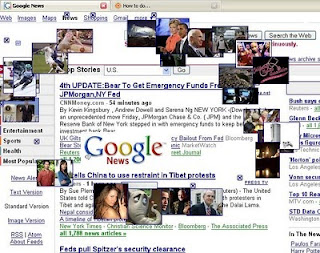
Google has a many tricks, easter eggs & many magics.. so today i'm tell you how to do cool google image trick. here is the demo picture.I think all you guys will love this google tricks..

1. You First Go to http://www.google.com

2. Click "images"

3. Fill in " google, cars, dogs " or any other word you want.


4. You will get a page with a lot of thumbnailed images.


5. Now delete the URL on the address bar


6. Copy the script down here, and paste it in your address bar


Monday, 1 October 2012

How To Protect Your Blog or Page Using Password

1. Login to your blogger Account >> Dashboard >> Edit Post >> Edit Pages

2. Now add the one of code given below to your page


<script language="JavaScript">
var password;
var pass1="PASSWORD-HERE";
password=prompt('Enter your password in order to view this page!',' ');
if (password==pass1) alert('Correct password, OK to enter!');
else {
  window.location="SITE-LINK";
}
</script>

How To Add Google Friend Connect Gadget to Blogger

1.Login to your Bogger Dashboard and go to Design >> & Page Elements.

2.Click on 'Add a Gadget' on the sidebar.

3.Select 'HTML/Javascript' and add the one of code given below

How To Add Welcome Message to Your Blogger


1.Login to your blogger dashboard--> Design- -> Edit HTML

2.Scroll down to where you see ]]></b:skin> tag .

3.Copy below code and paste it just After ]]></b:skin> tag


.element { position:fixed; bottom:1%; right:1%; padding:10px; font-family:Arial;
 background:#98DBF7; border:1px solid #2FBAF6; }


How To Change Mouse Cursor On Your Blogger

1.Log in to your Dashboard--> Desing- -> Edit HTML

2.Click on "Expand Widget Templates"

3.Scroll down to where you see this </body> tag

4.Copy below code and paste it just before the </body> tag


<style type="text/css">body, a, a:hover {cursor: url(http://cur.cursors-4u.net/cursors/cur-2/cur116.cur), progress;}</style>


5.Save Your Template And Your done.

Special Thanks www.cursors-4u.com

How To Add Google Index Pages Checker

Today i'm tell you how to add cool gadget to your website, this is a small and faster gadget! this tool has a very cool design! when you enter the "site:" operator with your chosen URL. It will return the total link count for each URL. this count url of google search engine only. i hope you really like this gadget so add your comments and share with you friends.Thank you.

1.Login to your dashboard--> Design- ->Page Elements

2.Click on 'Add a Gadget' on the sidebar.

3.Select 'HTML/Javascript' and add the code given below and click save.


<form method="get" action="http://www.google.com/search" target="_blank" rel="nofollow"><input name="q" value="site:" maxlength="255" size="40" type="text"><input value="Google Index" type="submit"><input value="en" name="hl" type="hidden"></form>


4. Now u r done.

 
  • Hit Counter

  • World Map